
7 Host Questions for U.S. Practices to Make WordPress HIPAA Compliant
A U.S. playbook for WordPress HIPAA compliance: 7 host checks to secure a signed BAA, enforce MFA, encrypt backups, and prove audit readiness.

7 Host Questions for U.S. Practices to Make WordPress HIPAA Compliant

Yes, WordPress can support a HIPAA-compliant website, but only under specific conditions. Your hosting provider must sign a Business Associate Agreement, and you need technical safeguards including encryption in transit and at rest, strict access controls, audit logging, and encrypted backups. None of that comes standard with a WordPress install. Compliance also demands ongoing work: routine risk assessments, timely patching, and signed BAAs with every vendor that touches patient data.
TL;DR:
- Using WordPress for a HIPAA-compliant website requires a signed BAA with your hosting provider and proper encryption of data at rest and in transit.
- WordPress.org sites hosted on HIPAA-eligible providers with signed BAAs are suitable, while WordPress.com and shared hosting plans generally are not compliant.
- Technical safeguards like multi-factor authentication, audit logs, encrypted backups, and regular vulnerability scans are essential to meet HIPAA standards.
- Relying on outdated plugins, insecure forms, or unverified hosts can lead to violations, even if encryption practices are in place.
- Ongoing risk assessments, staff training, and maintaining signed BAAs with all data handlers are critical for continuous HIPAA compliance.
Table of Contents
- Is WordPress HIPAA Compliant Out of the Box?
- WordPress.org vs. WordPress.com: Which One Can Handle PHI?
- What Should a HIPAA-Compliant WordPress Host Actually Guarantee?
- What Technical Safeguards Does a HIPAA-Compliant WordPress Site Need?
- Are WordPress Plugins and Forms Putting Patient Data at Risk?
- How Often Should You Run a HIPAA Risk Assessment for Your Website?
- How Do You Verify a WordPress Site Is Actually HIPAA Compliant?
- Building a HIPAA-Ready WordPress Site: The Order of Operations
- How Klyrmedia Approaches HIPAA-Compliant WordPress Projects
- Klyrmedia’s HIPAA-Compliant WordPress Design Service
- Where to Verify These HIPAA and WordPress Requirements
- Sources
Is WordPress HIPAA Compliant Out of the Box?
No software platform is HIPAA compliant by itself, and that includes WordPress. HIPAA doesn’t certify software. It regulates how covered entities and their business associates handle protected health information (PHI), and a website only enters that picture the moment it collects, stores, or transmits data tied to a patient’s health condition, treatment, or payment history.
Think of a basic contact form asking for name and phone number. That’s not PHI on its own. Add a field asking “What symptoms are you experiencing?” or “Which medication are you currently taking?” and you’ve crossed into electronic PHI (ePHI), and the HIPAA Security Rule now applies to whatever system stores that submission.
The Security Rule, laid out in 45 CFR Part 164, breaks obligations into three categories:
- Administrative safeguards: risk analysis, workforce training, designated security officer, incident response procedures.
- Technical safeguards: encryption, access controls, audit logs, transmission security.
- Physical safeguards: controlled facility access, workstation security, device and media controls, most of which shift to your hosting provider once you’re on cloud infrastructure.
Here’s where a lot of practice administrators get tripped up. The moment a third party creates, receives, maintains, or transmits PHI on your behalf, that vendor becomes a business associate, and you need a signed BAA before any data flows to them. Your web host almost always needs one. Your form processor needs one if intake forms touch PHI. Your backup provider needs one, because backups of PHI are still PHI. Skip the BAA and you’re not just risking a technical gap. You’re violating the law regardless of how good your encryption is, per HHS guidance on business associate responsibilities.
WordPress.org vs. WordPress.com: Which One Can Handle PHI?
This distinction trips up more healthcare marketing teams than any other single issue, and it’s worth getting straight before you build anything.
WordPress.org is free, open-source software you install on infrastructure you (or your host) control. WordPress.com is a hosted service run by Automattic, where you’re a tenant on their platform with limited control over the server environment. They share a name and a codebase heritage, but they are fundamentally different products for compliance purposes.
WordPress.com does not offer BAAs on its consumer or business plans. That single fact rules it out for any site handling PHI, full stop. If your intake form, patient portal link, or appointment widget could touch protected data, WordPress.com is off the table.
Self-hosted WordPress.org, deployed on the right infrastructure, is the viable path. Hosting models break down roughly like this:
- Shared hosting: multiple unrelated customers on the same server resources, typically no BAA available, unsuitable for PHI under any circumstance.
- Isolated VM or container hosting: dedicated virtual infrastructure, better isolation, sometimes BAA-eligible depending on the provider.
- Managed HIPAA hosting: providers built specifically for healthcare workloads, offering signed BAAs, encrypted storage by default, and infrastructure documentation you can hand to an auditor.
Choose a host that will sign a BAA in writing before you build anything else, and consider exploring the Best Business Health Insurance Plans for Small Businesses in Florida to complement your practice’s compliance and risk management efforts. Everything downstream, your safeguards, your logging, your backup strategy, depends on sitting on infrastructure the vendor has legally committed to protecting.
What Should a HIPAA-Compliant WordPress Host Actually Guarantee?
A host claiming to be “HIPAA-ready” isn’t automatically compliant, and the distinction matters more than most vendors admit. HHS guidance makes clear that responsibility for proper configuration always sits with you, the covered entity, not the infrastructure provider. A host can hand you HIPAA-eligible servers and you can still fail an audit if you misconfigure them.
Here’s the practical sequence for vetting a hosting BAA:
- Request the actual BAA document before signing anything else. Read it. It should name data locations, define breach notification timelines, and list any subcontractors who might touch your data.
- Ask which subcontractors are covered. A host might use a third-party backup service or CDN that never appears in your contract. If PHI flows through it, that subcontractor needs its own coverage under the BAA chain.
- Confirm tenant isolation. Are you on dedicated infrastructure, or sharing a database server with unrelated customers? Shared environments increase breach exposure.
- Verify encryption at rest, including key management. Ask whether they use a managed key management service (KMS) or hand you raw disk encryption with no rotation policy.
- Request current SOC 2 or SOC 3 reports. These third-party audits validate the host’s internal controls; a provider unwilling to share one is a red flag.
- Ask about incident response SLAs. How fast do they notify you of a suspected breach? HIPAA’s breach notification clock starts running the moment anyone in your organization or your associate’s organization discovers it.
- Check staff access practices. Does the host run background checks on employees with server access? Do they log every administrative action?
Pro Tip: Ask your host directly, “Will you provide a signed BAA before I pay for anything?” If they hesitate, dodge, or point you to a marketing page instead of a legal document, walk away. A host that treats compliance as a checkbox rather than a contractual obligation will eventually leave you holding the liability.
Red-flag answers include vague references to “enterprise-grade security” with no specifics, refusal to name subcontractors, or claiming HIPAA compliance is “built in” without ever producing a BAA.
What Technical Safeguards Does a HIPAA-Compliant WordPress Site Need?
Technical safeguards are where most WordPress sites quietly fail, usually because a default install ships with none of the following configured for healthcare use.
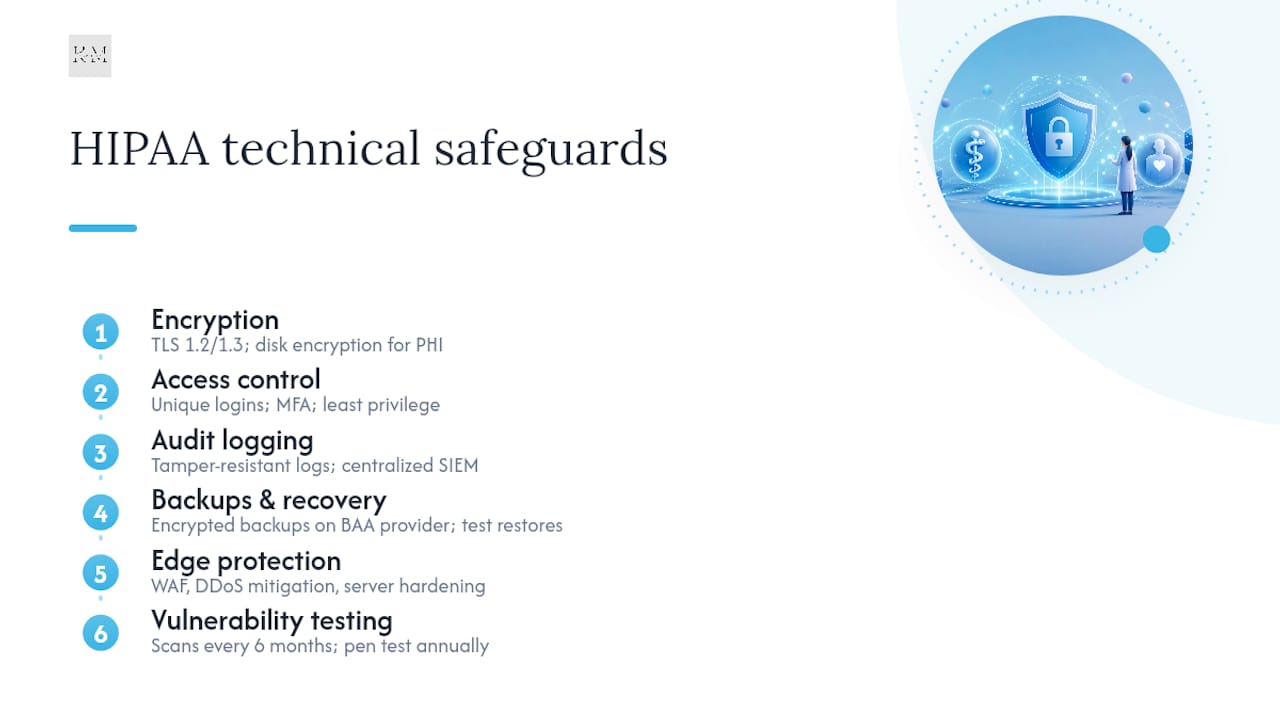
Encryption in transit and at rest. Every page transmitting or displaying anything touching PHI needs TLS 1.2 or TLS 1.3, no exceptions, no mixed-content warnings. That covers the visible padlock. Encryption at rest matters just as much and gets ignored far more often: your database, your uploads folder, and every backup copy need encryption on disk, not just in transit.
Access control. Every admin, editor, and contributor account needs a unique login tied to a real person, never a shared “admin” credential passed around the front desk. Multi-factor authentication (MFA) should be mandatory for anyone with dashboard access, and permissions should follow least privilege: a receptionist managing appointment content doesn’t need database access or plugin installation rights.
Audit logging. You need a record of who logged in, what they changed, and when, retained long enough to support an investigation if something goes wrong. Centralizing logs into a security information and event management (SIEM) system, rather than leaving them scattered across server files that rotate out after a week, gives you a defensible trail during an audit or breach investigation. Logs should be tamper-resistant. If an attacker can edit the log that would reveal their own intrusion, the log is worthless.
Backups and disaster recovery. Backups containing PHI carry the same sensitivity as production data: they must be encrypted, stored with a provider under a BAA, and tested periodically through actual restores, not just confirmed as “completed” in a dashboard. Define your recovery time objective (RTO) and recovery point objective (RPO) in writing so everyone knows how much downtime and data loss is tolerable before a restore begins.
Edge protections and testing cadence. A web application firewall (WAF) filters malicious traffic before it reaches WordPress. DDoS mitigation keeps a flood of junk requests from taking your site offline during business hours. Server hardening, disabling unused ports, removing default files, restricting file permissions, closes the gaps automated scanners look for first.
Vulnerability scans should run at least every six months, with a full penetration test conducted annually. That cadence isn’t arbitrary. It reflects how quickly new vulnerabilities surface in a codebase as actively developed and widely targeted as WordPress.
Are WordPress Plugins and Forms Putting Patient Data at Risk?
Plugins are the single most common way a compliant-looking WordPress site quietly breaks compliance, and form submissions are where it usually happens first.
Here’s the mechanism. You install a contact form plugin, add a field for “reason for visit,” and now every submission stores PHI directly in your WordPress database, usually with no encryption applied by the plugin itself. If that plugin developer has any level of remote access, for support, updates, or telemetry, they’re arguably handling PHI too, which means they need a BAA. Most plugin developers have never heard of a BAA and would never sign one.
The safer pattern: keep PHI out of WordPress entirely wherever you can. Route sensitive intake through a dedicated, BAA-covered third-party system, a patient portal, a secure scheduling platform, rather than a native WordPress form. Embed the portal’s widget or link out to it, but don’t let the submission data land in your WordPress database.
Vendor management for whatever plugins remain:
- Confirm whether the plugin developer ever has access to submitted data, and if so, get a BAA or don’t use it.
- Check the plugin’s update history; anything untouched for over a year is a liability regardless of features.
- Read the support policy: does the vendor patch reported vulnerabilities quickly, or vanish after the initial sale?
Pro Tip: Run a plugin audit every quarter, not just at launch. Delete anything inactive. An unused plugin still sitting on your server is still a vulnerability sitting on your server, active or not.
Additional hardening: disable the built-in file editor in the WordPress dashboard (Appearance > Theme File Editor is a favorite entry point for attackers who gain limited access), and remove every unused theme along with deactivated plugins rather than leaving them dormant.
How Often Should You Run a HIPAA Risk Assessment for Your Website?
Compliance isn’t a launch event. It’s a maintenance schedule, and the organizations that get burned are almost always the ones that treated their initial build as the finish line.
- Scope and run a risk analysis covering your website specifically. Map every place PHI could enter, move through, or rest within your systems, forms, chat widgets, appointment tools, backup destinations, and document the risk level for each.
- Set a patching cadence and stick to it. Routine WordPress core, theme, and plugin updates should happen on a defined schedule, weekly at minimum. Critical security patches need same-day or next-day deployment, not “whenever someone gets to it.”
- Build a monitoring and incident response playbook before you need one. Define who gets notified first, how fast, and what the escalation path looks like if a scan flags a breach indicator. HIPAA’s breach notification obligations start a clock the moment discovery happens, so ambiguity about who’s in charge costs you time you don’t have.
- Retain documentation an auditor will ask for. That means training records showing staff completed HIPAA awareness sessions, your written risk assessment, and scan or penetration test reports dated and filed, not verbally promised.
Treat this as a continuous operational discipline. Threats shift, plugins get abandoned by their developers, and staff turn over. A risk analysis from eighteen months ago tells you almost nothing about your exposure today.
How Do You Verify a WordPress Site Is Actually HIPAA Compliant?
Before you trust any WordPress site, whether it’s one you inherited or one a vendor built for you, pull the actual evidence rather than accepting a verbal assurance.
Documents to request:
- A signed BAA naming the specific hosting entity and effective date, not a generic template.
- A current SOC 2 or SOC 3 report from the host.
- The most recent vulnerability scan and penetration test results, dated within the last twelve months.
- Written backup policy specifying encryption method, retention period, and last successful restore test.
Site-level checks you can run yourself:
- Confirm MFA is enforced for every dashboard account, not optional.
- Pull a full plugin inventory and check version numbers against the latest release for each.
- Check your analytics and caching configuration. Google Analytics and page caching layers can inadvertently capture form field data or URL parameters containing PHI if not configured carefully.
Red flags that should trigger immediate remediation: any plugin more than a year out of date, no available BAA from the current host, shared admin logins, or a backup policy nobody can produce in writing. Any one of these is reason enough to escalate to your IT lead or replace the vendor.
Building a HIPAA-Ready WordPress Site: The Order of Operations
Sequence matters here. Doing these steps out of order is how practices end up retrofitting security onto a live site that’s already been collecting patient data insecurely for months.
- Plan. Minimize PHI wherever the design allows it. Select a host that will sign a BAA before writing a single line of content. Inventory every plugin and third-party integration you’re considering, and reject any that can’t support a BAA if they’ll touch patient data.
- Build. Implement TLS across every page, enforce MFA for all dashboard users, harden the server configuration, and set up encrypted backups from day one rather than adding encryption after launch.
- Verify. Schedule your first vulnerability scan and penetration test before going live, not after. Run a documented risk assessment covering the finished build.
- Operate. Enforce BAAs with every vendor touching data, on a recurring six-month scan cadence with annual penetration testing, and put staff through HIPAA training before they ever touch the dashboard.
Each stage builds on the last. Skipping the planning phase to “just build it and fix compliance later” is the single most common reason healthcare websites end up in breach territory within their first year.
How Klyrmedia Approaches HIPAA-Compliant WordPress Projects
Klyrmedia builds healthcare websites around the sequence outlined above: discovery first, then hosting selection with a signed BAA in hand, then a hardened WordPress build, then testing, then a documented handoff.
Every project starts by mapping where PHI actually flows on the site, then choosing infrastructure that supports encryption, access controls, and audit logging from day one rather than bolted on later. Deliverables include a signed BAA with the hosting environment, a hardened WordPress configuration with MFA enforced, and a monitoring setup that flags issues before they become incidents.
For practices that want an ongoing partner rather than a one-time build, Klyrmedia’s HIPAA-compliant website workflow covers the full process in more procedural detail, from initial risk mapping through managed operations.
— Opinly
Klyrmedia’s HIPAA-Compliant WordPress Design Service
You’ve read the checklist. Now consider what it takes to execute it without a dedicated technical team. Klyrmedia is the alternative to piecing together a HIPAA-compliant WordPress site through a patchwork of freelancers, generic hosting plans, and plugin guesswork. Klyrmedia designs, hardens, and manages the site for you, with a signed BAA already in place before your first patient record ever touches the server.

The service covers the full build: secure hosting selection with BAA coverage confirmed upfront, TLS encryption, MFA enforcement, encrypted backups, and a minimized plugin footprint so form submissions don’t end up sitting unprotected in your database. Once the site launches, Klyrmedia handles the ongoing side too: scheduled vulnerability scans, patching, and monitoring, so compliance doesn’t quietly lapse six months after launch the way it does on so many unmanaged sites.
If your practice also wants secure appointment reminders or patient communication that avoids emailing PHI directly, Klyrmedia’s marketing automation services can build those workflows around HIPAA-safe channels from the start.
Visit Klyrmedia’s HIPAA-compliant web design page to request a compliance review of your current site or start planning a new build with a signed BAA from day one.
Where to Verify These HIPAA and WordPress Requirements
For anything in this playbook, go to the primary source rather than a third-party summary. The HHS Security Rule page lays out the administrative, technical, and physical safeguard requirements in full legal detail. The HHS breach notification and business associate guidance clarifies exactly when a BAA becomes mandatory. WordPress.org’s own documentation confirms the software distinction between self-hosted and hosted WordPress that determines whether a BAA is even possible. Bookmark all three. An auditor will expect you to know them, not just your web vendor.
This article is general information, not a substitute for advice from a qualified doctor. Consult a qualified healthcare professional about your own circumstances before acting on anything here.

