
The Checklist for Medical Practice Growth That Actually Works
Discover a proven checklist for medical practice growth that prioritizes fixing capacity issues before marketing efforts, ensuring lasting success.

The Checklist for Medical Practice Growth That Actually Works

Start by measuring access and fixing capacity constraints. Then, and only then, invest in marketing. That order matters more than any tactic on this page because marketing fills capacity, it doesn’t create it. Spend on ads before you fix scheduling and you’re just paying to frustrate patients who can’t get an appointment anyway.
The real checklist for medical practice growth runs across eight buckets: strategy and goals, KPIs and finance, operations and capacity, staffing and culture, patient experience and retention, marketing and local SEO, technology and integrations, and compliance and credentialing.
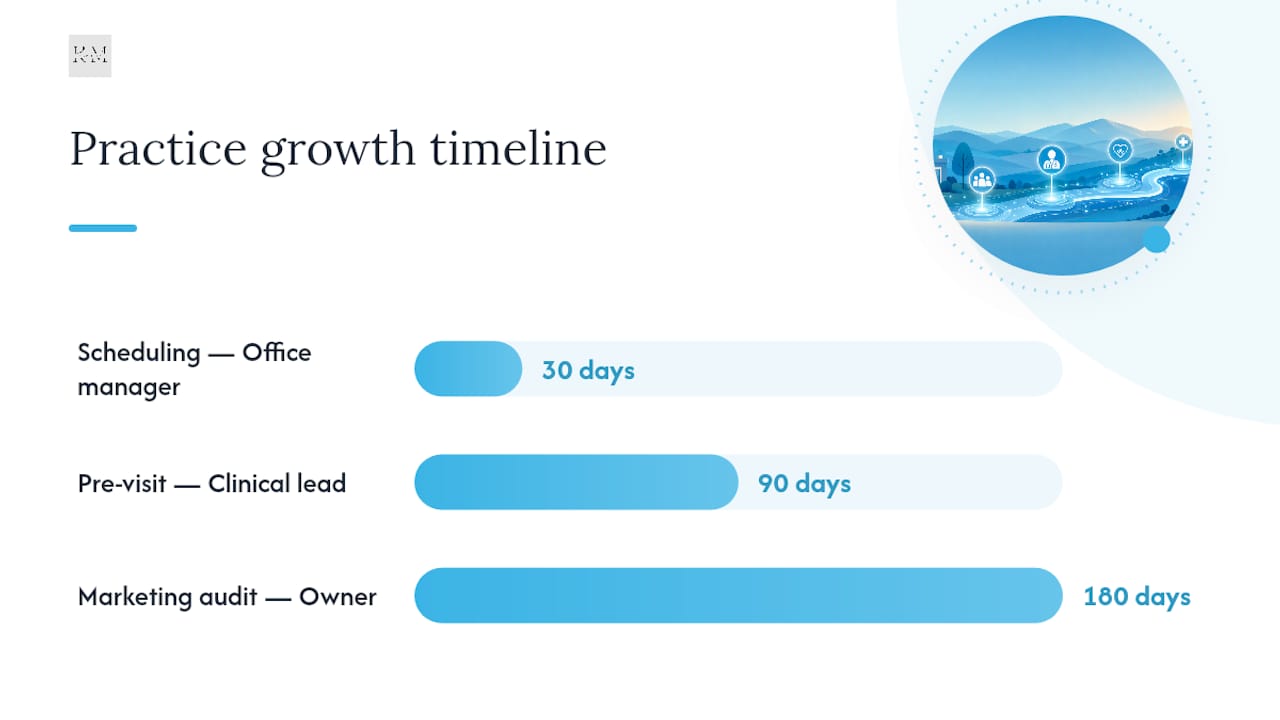
First 30 days: Measure your days to third-next-available. Fix your scheduling template. Clean up your NAP (name, address, phone) data across every online listing. First 90 days: Enforce pre-visit planning per AMA STEPS Forward protocols. Enable real-time online booking. First 180 days: Run a full Zocdoc-style marketing audit. Layer in review automation and retention workflows.
Klyrmedia works with practices at every stage of this rollout, and a downloadable version of the checklist below covers all eight buckets in printable form.
| Timeline | Priority Action | Owner |
|---|---|---|
| 30 days | Fix NAP data and scheduling template | Office manager |
| 90 days | Launch pre-visit planning, enable online booking | Clinical lead |
| 180 days | Full marketing audit, review automation | Practice owner |
Key Takeaways
Sustainable medical practice growth depends on fixing capacity and operational bottlenecks before increasing marketing spend, then measuring results against a defined KPI dashboard.
| Point | Details |
|---|---|
| Fix capacity first | Measure days to third-next-available before spending on marketing or hiring. |
| Track eight core KPIs | Monitor slot fill rate, no-show rate, and collection rate on a monthly cadence. |
| Use PDSA cycles | Pilot scheduling and workflow changes on a small scale before rolling out practice-wide. |
| Fix NAP data before ads | Consistent listings across directories increase local search visibility. |
| Klyrmedia supports execution | Klyrmedia builds HIPAA-compliant sites and retention automation that map to this checklist. |
Table of Contents
- Building a Checklist for Medical Practice Growth Around Real Goals
- KPIs and Budget: What to Measure for Medical Practice Improvement
- Operational Efficiency: The Fastest Lever for Practice Growth
- Hiring and Retention That Support Sustainable Growth
- Patient Retention Systems That Compound Over Time
- Local SEO and Marketplace Strategy for Medical Practice Improvement
- Tech Stack Priorities: EHR, Scheduling, and Telehealth
- Compliance and Credentialing Risks That Stall Growth
- Running the Growth Checklist With PDSA and a 30/90/180 Plan
- When to Bring In a Healthcare Marketing Agency
- How Klyrmedia Supports This Checklist in Practice
- Authoritative Resources for Practice Growth Planning
- Frequently Asked Questions
- Sources
Building a Checklist for Medical Practice Growth Around Real Goals
Growth isn’t one thing. It’s five distinct paths, and picking the wrong one wastes a year and a lot of cash.
You can raise throughput in your existing footprint, add a provider, add a service line, open a second location, or acquire another practice. Each fits a different constraint, and confirming which constraint you actually have before committing capital is the single highest-leverage move on this whole list.
- Raise throughput when your schedule has gaps but demand exists. Fix templates first.
- Add a provider when your days to third-next-available consistently run past 10 days.
- Add a service line when patients are already asking for something you don’t offer.
- Open a second location only once your first site is genuinely full by objective measures.
- Acquire a practice when you want patient volume faster than organic growth allows.
Set targets in concrete numbers: “grow new patient visits 15% in Q2” beats “grow the practice.” Track days to third-next-available weekly. Once that number crosses 10 days, you have your answer: hire, don’t just advertise.
Pro Tip: Measure your constraint before you spend a dollar on marketing. A packed waiting room and a slow phone line are two completely different problems with two completely different fixes.
KPIs and Budget: What to Measure for Medical Practice Improvement
Eight numbers tell you almost everything about whether your growth plan is working: new patients per month, days to third-next-available, slot fill rate, no-show rate, collection rate, net revenue per provider per day, patient retention rate, and cost per booked visit.
Budget in phases, not lump sums. You’ll need line items for hiring, ramp payroll (the gap between a new hire’s start date and full productivity), marketing spend, any build-out costs, and working capital to cover credentialing delays that can run 90 days or longer.
- If your cost per booked visit runs $40 and you spend $2,000 monthly on local marketing, expect roughly 50 booked visits.
- Track that ratio monthly. If it drifts upward with no change in conversion, something in your funnel broke.
Operational Efficiency: The Fastest Lever for Practice Growth
Operational fixes usually beat hiring for speed and cost. Modified wave scheduling, which groups several patients at the top of the hour instead of spacing them in uniform blocks, increases schedule density and absorbs no-shows better than rigid time slots.
Quick wins worth testing this month:
- Switch high-no-show slots to modified wave templates.
- Protect two same-day slots per provider per day for urgent visits.
- Match visit length to actual visit type instead of a one-size-fits-all block.
- Cut documentation drag by templating your top 10 chief complaints in the EHR.
A short workflow audit checklist keeps this honest:
- Time three full clinic days from check-in to checkout.
- Flag every step where a patient or staff member waits more than 5 minutes.
- Run a 10-minute morning huddle covering the day’s schedule, no-show risks, and any staffing gaps.
AMA STEPS Forward frames PDSA cycles (Plan, Do, Study, Act) as the standard method for testing these changes without betting the whole practice on an untested idea.
Pro Tip: Run any scheduling change on one provider’s calendar for two weeks before rolling it practice-wide. You’ll catch problems while they’re still cheap to fix.
Confirm capacity actually increased by watching room utilization, provider hours spent in clinic versus admin work, and slot fill rate over the following month.

Hiring and Retention That Support Sustainable Growth
Adding headcount only pays off when it removes a real bottleneck. Five roles tend to pay back fastest: an advanced practice provider for volume, a care coordinator for chronic-disease follow-up, an administrative specialist for front-desk overflow, a revenue cycle specialist once collections lag, and a dedicated scheduler once your office manager is buried in phone calls.
Onboarding checklist for any of these roles:
- Written SOPs for the role’s top five recurring tasks.
- EHR templates built and tested before day one.
- A 30-day performance benchmark the new hire knows about upfront.
- Protect physician-only clinical time by shifting administrative tasks to support staff.
- Run weekly huddles so every role knows the day’s priorities.
- Invest in continuous training rather than one-time onboarding.
AMA’s Saving Time Playbook points to pre-visit planning and annual prescription-renewal strategies as two of the highest-yield time recoveries for existing staff, often more valuable than adding a body.
Patient Retention Systems That Compound Over Time
Acquisition gets the attention, but retention is where the real revenue compounds. Building automated touchpoints around booking, reminders, and follow-up keeps patients from drifting to the next practice that answers its phone.
Core automation checklist:
- Online booking with real-time availability, not a “request an appointment” form that sits in a queue.
- SMS and email reminders sent 48 hours and 2 hours before a visit.
- Portal messaging for lab results and simple questions.
- Post-visit follow-up within 24 hours for anything beyond a routine check-up.
Recall cadences differ by patient type: wellness visits typically warrant a reminder at the 11-month mark, while chronic-care patients need touchpoints every 60 to 90 days depending on the condition.
- Make your booking page mobile-first. A page that’s slow to load loses patients before they even see your availability.
- Display accepted insurance plans prominently. Patients bounce fast when they have to call to find out.
- Ask for a review within 24 hours of a positive visit, when the experience is still fresh.
A tool like Klyrmedia’s patient retention automation can handle these cadences without adding staff hours.
Local SEO and Marketplace Strategy for Medical Practice Improvement
Fix your NAP data first. Zocdoc’s marketing checklist names consistent name, address, and phone data across listings as the foundation everything else builds on, and inconsistent NAP data actively suppresses local search visibility before you’ve spent a cent on ads.
- Audit every directory listing (Google, Yelp, Healthgrades, insurance directories) for matching NAP data.
- Complete your Google Business Profile fully: correct categories, real photos, accurate services, and service-area settings.
- Build a repeatable review-generation process, not a one-time push.
Evaluate marketplaces like Zocdoc by how they book, not just whether they list you:
- Real-time booking integrations fill schedules faster than callback-request models.
- Use marketplaces strategically to fill specific gaps (a slow Tuesday afternoon, a new provider’s open calendar) rather than as your entire acquisition strategy.
Reputation management runs on cadence and care:
- Request reviews within 24 hours of a good visit; recency measurably affects how much a review influences a new patient’s decision.
- Keep reply templates HIPAA-aware. Never confirm a patient’s visit or condition in a public reply, even a positive one.
Measure ROI by booked-and-kept visits per channel, not clicks or impressions. A partner resource on reputation management covers review workflows in more depth if you want to build this out further. And remember: slow mobile pages kill conversions before a patient ever books. Core Web Vitals data shows that going from a 1-second load time to 3 seconds increases the chance a visitor leaves by roughly 32%.
Tech Stack Priorities: EHR, Scheduling, and Telehealth
Vendor selection mistakes are expensive and hard to unwind once patient data lives inside a system. Prioritize HIPAA compliance first, API and integration capability second, multi-site support if you’re growing beyond one location, and reporting depth that actually surfaces the KPIs you’re tracking.
- Confirm any vendor signs a business associate agreement before you hand over patient data.
- Ask specifically how scheduling, EHR, billing, and patient communications integrate, not just whether they “connect.”
- Request references from other healthcare practices, not general small-business clients.
Sequence your integrations to avoid double data entry: connect scheduling to your EHR first, then link billing, then layer in patient communications last. Building communications before the core systems talk to each other creates duplicate work that staff will quietly abandon within weeks.
- Map your current tools and flag every manual data re-entry point.
- Fix the highest-friction integration first, usually scheduling to EHR.
- Add telehealth as a capacity lever for specialties where it fits, factoring in credentialing timelines, reimbursement rules, and how comfortable your patient base actually is with video visits.
Compliance and Credentialing Risks That Stall Growth
HIPAA doesn’t just govern medical records. It governs the forms on your website, the chatbot answering after-hours questions, and any third-party tool touching patient data. HHS guidance makes covered entities and their vendors responsible for privacy and security compliance across all of it.
- Confirm any marketing automation, chatbot, or form vendor signs a business associate agreement.
- Start credentialing for a new provider or location months ahead. Medicare provider file updates alone can take 60 to 90 days.
- Watch for red flags that should stop a growth plan cold: unwritten processes, a single person owning a critical workflow, or missing payer enrollment before opening day.
Running the Growth Checklist With PDSA and a 30/90/180 Plan
Structure keeps growth plans from dying in the “someday” pile. A 4-step operational reset, audit, delegate, systematize, protect, can deliver measurable time recovery in as little as 30 to 60 days when trained staff execute against documented SOPs.
- Days 1 to 30: Audit current workflows. Pilot one scheduling template change on one provider.
- Days 31 to 90: Delegate administrative tasks. Test a new reminder cadence and measure no-show impact.
- Days 91 to 180: Systematize what worked. Protect physician time permanently and revisit budget checkpoints.
| PDSA Step | Example Test | Success Metric |
|---|---|---|
| Plan | Design modified wave template | Projected slot fill increase |
| Do | Pilot on one provider’s schedule | Two-week trial period |
| Study | Compare fill rate before/after | Change in slot fill rate |
| Act | Roll out practice-wide or revise | Sustained metric improvement |
Set a budget checkpoint at day 90: if ramp payroll is running ahead of new patient revenue with no clear trend upward, pause hiring before it compounds into a bigger problem.
When to Bring In a Healthcare Marketing Agency
Not every item on this checklist needs to happen in-house. Once you’re evaluating outside help, scope the engagement clearly: HIPAA-compliant web builds, local SEO, marketing automation, and reporting that ties back to your KPI dashboard.
Ask any prospective partner these questions directly:
- What’s your documented process for HIPAA compliance across web forms and automation?
- Can you provide references from other healthcare practices, not general business clients?
- What does your reporting cadence look like, and does it map to booked-and-kept visits?
- Site build and directory cleanup typically run 30 to 60 days.
- Review automation and reputation workflows usually launch within the first 90 days.
- Ongoing reporting cadence should be monthly at minimum, tied to the KPIs you’ve already defined.
Red flags to walk away from: no documented HIPAA process, no healthcare-specific references, or no written SOPs for how patient data moves through their systems.
Pro Tip: Ask any agency to show you a sample report before you sign anything. If it’s full of vanity metrics like impressions instead of booked visits, that’s your answer.
A Practitioner’s Note on Growth That Actually Lasts
Sustainable growth pairs capacity building with disciplined measurement, not a bigger ad budget. The practices that scale well tend to fix a scheduling template or a documentation bottleneck before they touch a marketing dollar, and that order is rarely the order most owners try first.
How Klyrmedia Supports This Checklist in Practice
Most of what slows practices down on this checklist isn’t strategy. It’s execution: a website that loads too slowly on mobile, listings with mismatched addresses, or a follow-up process that depends on one overworked front-desk employee remembering to make a call.

Klyrmedia builds HIPAA-compliant websites designed around mobile speed and real-time booking, cleans up local listings for consistent NAP data, and sets up automated recall and review workflows so retention doesn’t depend on memory. Practices working with Klyrmedia typically see more booked-and-kept visits, faster site conversion, and a steadier flow of new reviews without adding staff hours. If you’re ready to see where your own practice stands against this checklist, request a readiness audit through Klyrmedia’s healthcare solutions page and get a clear picture of what to fix first.
Authoritative Resources for Practice Growth Planning
- AMA STEPS Forward for the PDSA framework and pre-visit planning modules referenced throughout this checklist.
- HHS HIPAA guidance for the current privacy and security rules governing patient data in marketing and automation.
- Zocdoc’s marketing checklist for a deeper breakdown of local listing and reputation tactics.
- Workflow improvement guidance from FPM (AAFP) for scheduling template details beyond modified wave.
- A downloadable 30/90/180 checklist and KPI dashboard template can help translate this article into a working document your team actually uses week to week.
Frequently Asked Questions
What’s the first step in a checklist for medical practice growth? Measure your days to third-next-available and fix any scheduling bottlenecks before spending on marketing. Capacity problems make marketing spend inefficient.
How long does it take to see results from these growth strategies for medical practices? Operational fixes like scheduling changes can show results in 30 to 60 days. Marketing and retention systems usually need 90 to 180 days to show a clear trend.
What KPIs matter most when trying to grow a medical practice? Days to third-next-available, slot fill rate, no-show rate, and patient retention rate reveal the most about whether growth actions are working.
Should a growing practice hire before or after increasing marketing spend? Hire based on capacity signals like a consistent 10-plus day wait to third-next-available, not based on marketing goals. Marketing fills capacity you’ve already built.
How does HIPAA affect marketing automation for medical practices? Any tool handling patient data, including chatbots and reminder systems, needs a signed business associate agreement and documented compliance processes under HHS rules.
Sources
- 4-step process improves quality of care in medical practice | AMA STEPS Forward
- Laws & regulations | HHS Office for Civil Rights (HIPAA)
- Workflow improvement | FPM (AAFP)

